 Koloft
Remote folders (alpha)
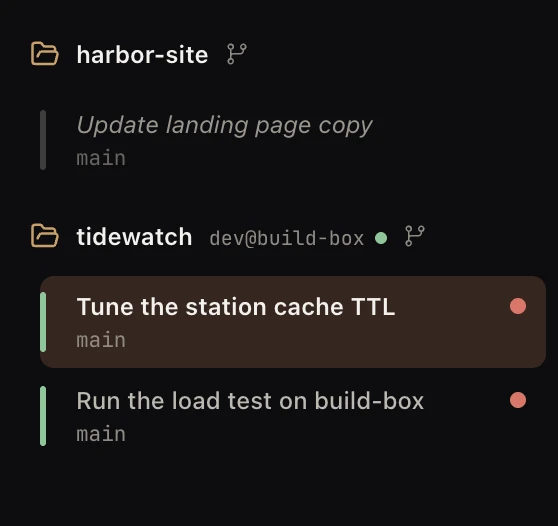
Koloft can open a folder that lives on another computer, one you reach with
ssh (a safe way to log in to another computer over the network). The agent
(Claude Code, Codex, Muse or Antigravity) runs over there. You watch it and work with it
from your Mac. This part is alpha: it is early, it works, and it
still has gaps. The ones we know are listed below.
Add one
Click the Add workspace button (the folder with a plus) at the top of the window, then
pick Remote directory…. Koloft asks for two things:
- Machine:
user@host, or a name from your ssh settings -
Path on the machine: the full path, starting with
/, such as/home/me/project
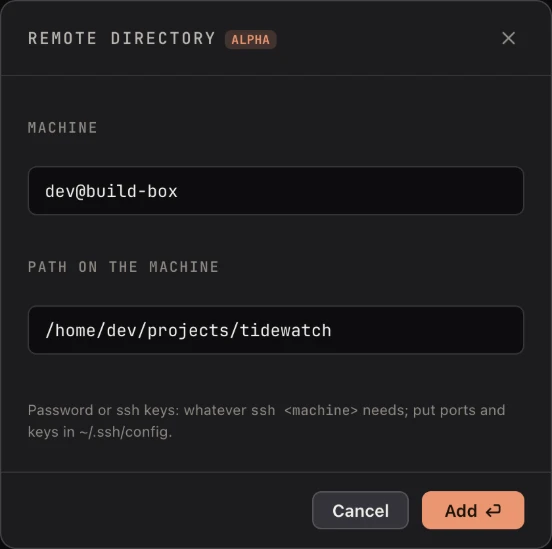
Keys set in ~/.ssh/config work everywhere. A password works too: type it once
in a tab, and Koloft's own checks use that login after that. A Claude Code, Codex or Muse
tab asks you for it there. On a machine ssh has never seen before, it also asks you to say
yes to that machine's key. An Antigravity tab cannot ask yet: sign in through one of the
other three there first.
These work too:
- a company jump host, the computer you must pass through to reach the others
- a gateway computer that gives you no real terminal, such as JumpServer
- a login shell that is
tcsh,cshorfish - a
RemoteCommandorRequestTTYline in your ssh settings - keys from an ssh agent that your login shell starts
What happens there
The agent runs on the other machine. The account it uses comes from
the pool on your Mac. Its git and gh use a
git account kept on that machine, once you
pick one. Claude Code's and Antigravity's transcripts (the written record of each session)
stay there, and rsync (a tool that copies files) brings copies back; Codex
and Muse sessions are listed by asking the tool on the machine. Either way the sessions
list reads like a folder on your Mac.
your Mac                     the other machine
+-----------------+          +------------------+
| Koloft          |          | tmux             |
|                 |   ssh    |  +------------+  |
| the tab         | <------> |  |   claude   |  |
|                 |          |  +------------+  |
| account it      |          |                  |
| picked          | -------> | claude uses it   |
|                 |          |                  |
| copies of       |  rsync   | transcripts      |
| transcripts     | <------- | (the real ones)  |
|   |             |          |                  |
|   v             |          |                  |
| sessions list   |          |                  |
+-----------------+          +------------------+
-
The picture shows Claude Code; Muse and Antigravity run the same way. They run inside
tmux(a program that keeps a terminal going after you leave). If the link drops, the agent keeps working. Koloft keeps trying to reach the machine: soon at first, then less and less often, down to once a minute. Close the session's tab meanwhile and Koloft says so:Could not stop “…” on <machine>: <why>. It is still running there.The row stays lit, and a click joins that session again. -
Codex is different: it runs as its own server on the machine, and the Codex screen on
your Mac talks to that server over ssh. The server is signed in with the Codex account
picked on your Mac: no login is stored on the machine. If ssh drops or the Mac sleeps,
the running turn keeps going there, and the tab reconnects by itself. Closing the tab
ends the server; a click on the row resumes the same conversation on a new one. With
Skip permission prompts on, a new Codex session there runs
with no sandbox and never asks, as on your Mac, whatever the account's own Codex
settings say. With it off, in a folder the machine trusts, a shell command runs in
Codex's sandbox: it may write inside the folder, not outside it, and a sandbox or
approval setting in the account's own Codex settings still wins. Some machines block
that sandbox with AppArmor (a Linux guard on what programs may do); a plain Ubuntu 24.04
does. There, the tab says so before Codex starts (with the switch on too) and names the
fix: load an AppArmor profile on that machine that allows userns (user namespaces) for
/usr/bin/bwrap(needs root). The session still starts. With the switch off, each command Codex runs in that sandbox fails until then; with it on, there is no sandbox to block. -
The agent gets the
koloftcommand there too, a moment slower, since each answer comes from Koloft on your Mac (see Agents can use Koloft too). It can also start a new session on that machine, in its own git worktree (a second copy of the repo on its own branch). -
The first session on a machine takes a few seconds longer:
claudefetches its own settings once. -
A Claude Code session there runs the machine's own
claude, so a remote folder offers Claude Code even when your Mac has none. Codex, Muse and Antigravity still need theirs on your Mac. - For a session there, the sidebar is a few seconds behind the machine: its light, its title, and the line that says what it did last.
- Your butler looks after a remote folder's sessions too. It runs on your Mac, not on the machine. From your phone, see A butler on Discord.
What Koloft installs there
-
bash,tmux,rsync,python3(for Muse) andcurl(when the machine has neither curl nor wget), if the machine is missing them, from its own package manager, which may ask for its sudo password (the admin password) -
the agent itself, if the machine has none:
claude,muse(about 330 MB, once) andagyfrom their official installers;codexin the same version as your Mac's, withnpm(Node's package tool), Node first -
if the
claude,museoragythere is older than this Koloft needs, it gets the tool's own update before the session starts; if that does not bring it up to date, the session does not start and the tab asks you to run the update yourself -
gh, GitHub's command-line tool, if the machine has none (about 40 MB, once) -
playwright-cli, withnpm, the first time a Claude Code session there runs it (about 20 MB, once) - the sign-in tool (Git Credential Manager), if the machine has none, when you add a git account for it by signing in on a site in your browser
-
a small
koloftscript, and the guide that tells the agent how to use it -
Node, for the status line and for
npm(Muse has no status line, so a Muse session skips this); if that fails, the session still runs, just without a status line -
on an old Linux, where the usual Node build will not run, one more Node build made for
older Linux, from
unofficial-builds.nodejs.org
The Workbench there
The Workbench works on a remote folder too. These are all the machine's, not your Mac's:
- its files and its changes
- the editor and the shell
- the Scratchpad
- links inside a Markdown file, and
path:linelinks - the card you see with the Workbench folded
An HTML file there opens as a web page, with the styles, scripts and pictures next to it,
all read from the machine. Its address starts with koloft-machine://. Such a
page cannot keep anything in the browser: it has no localStorage, IndexedDB
or cookies (the places a page saves its own data).
When the agent runs a plain open with a file the Workbench can show, or with
a web address, the file or page shows in that session's Workbench, as it does on your Mac.
A localhost address still means your Mac, not the machine. With "Let agents
use Koloft" off, a plain open there never reaches the Workbench: it goes to
the machine's own open, if it has one.
The count of changed files there catches up at most every 10 seconds.
A file that changes on the machine shows up by itself: a file you have open reloads, an
editor with unsaved edits says Changed on disk, and Browse shows a file added
to or removed from an open folder. This catches up every 2 seconds while a session on that
machine is working, every 5 seconds while a tab on that machine is open but idle, and
every 20 seconds otherwise. Browse's Reload button lists the whole tree again.
If ssh drops for a moment, Files keeps what it showed and Changes offers Retry.
The folder's git panel works there too: the behind number, Fetch now and Pull all run on the machine.
Not there yet
- Images and PDFs (document files) from the machine do not show a preview.
- Only a Claude Code session there can drive your web tabs; Codex, Muse and Antigravity cannot yet. See Agents can use Koloft too.
-
A session row's menu offers Copy path (
machine:/path) instead of Reveal in Finder. - ⌥⏎ search finds a remote Codex session by its title only, not by what was said in it. A remote Muse session is the same while its machine is not connected.
Next page → A butler on Discord